For online gaming, the quality of your experience depends far more on latency and a stable connection than on a huge download speed. Latency, often shown in games as ping, is the delay between your action and the game responding, and low, steady latency is what makes play feel responsive. Most modern internet plans have ample speed for gaming, so once you have enough, the real focus is responsiveness, stability and how you connect, rather than chasing the biggest headline number.
This guide explains what actually affects gaming performance, why ping matters more than raw speed, how server location comes into play, and what to look for in a connection if gaming matters to you. The reassuring news is that smooth gaming is well within reach without an extreme plan.
Conditions vary by game, server and connection, so treat this as a general explainer and adjust to your particular setup.
What actually affects gaming performance?
Three things matter most: latency, stability and, to a lesser extent, speed. Latency is the round-trip delay for your actions, and low latency means the game feels instant. Stability means a connection that does not spike or drop, since a sudden lag spike at the wrong moment can ruin a match. Raw speed, the download figure people focus on, matters mainly for downloading games and updates rather than for the moment-to-moment play itself.
This is why a very fast plan does not automatically mean great gaming. Once you have enough speed, which most plans provide, extra megabits do little for responsiveness. What improves the experience is lower, steadier latency and a connection that holds firm during play, which depend more on how you connect than on the headline speed.
Why does ping matter more than speed?
Online games send small, frequent updates back and forth in real time, so they are exquisitely sensitive to delay. A low ping means your inputs register quickly and the game stays in sync; a high or fluctuating ping means actions feel laggy and characters appear to jump. Because these updates are tiny, they need very little bandwidth, which is why even a modest plan can game well if its latency is good.
Stability is the close companion of ping. A connection that is usually fast but occasionally spikes will cause frustrating lag at unpredictable moments. For competitive play especially, a steady, low-latency connection beats a fast but erratic one every time, which reframes what to prioritize when gaming is important to you.
| Factor | Effect on gaming |
|---|---|
| Latency (ping) | Most important; low and steady feels responsive |
| Stability | Prevents disruptive lag spikes mid-game |
| Server distance | Closer servers mean lower unavoidable delay |
| Raw download speed | Matters mainly for downloads and updates |
The table ranks what influences your experience. Notice that the headline speed sits at the bottom for actual play, while latency and stability sit at the top.
How does server location affect your ping?
Physical distance adds delay, because data takes time to travel. Connecting to a game server far away adds latency that no plan can remove, since it is a function of distance rather than your connection quality. Playing on a server region close to you, where games offer a choice, usually gives a far lower and more comfortable ping than a distant one.
Where you can, choosing a nearby server region in a game's settings is one of the most effective ways to improve your ping. It is also why two players on identical plans can have very different experiences if one is on a nearby server and the other on a distant one, the difference is the distance, not the plan.
What should you look for in a connection for gaming?
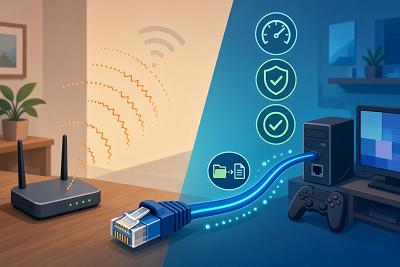
Prioritize a stable, low-latency connection over the highest speed tier. A wired Ethernet connection to your console or gaming PC is the single most effective improvement, because it is more stable and lower in lag than Wi-Fi. If wired is not possible, strong Wi-Fi placement or mesh helps keep the signal steady. A plan with enough speed to handle large game downloads comfortably is useful, but you do not need an extreme tier purely for gameplay.
Features that manage congestion, sometimes called Quality of Service, can also help by stopping a big download elsewhere in the house from spiking your latency mid-game. A connection type with low, steady latency, such as fiber or cable, also helps, and combining a wired connection, sensible Wi-Fi, adequate speed and nearby servers gives you the foundation for smooth online gaming.
Frequently asked questions
Do I need the fastest plan for gaming?
No. Once you have enough speed, which most plans provide, gameplay depends on low, steady latency and stability rather than raw speed. A faster tier mainly helps download games and updates more quickly.
What is ping and why does it matter?
Ping is the round-trip delay between your action and the game responding. Low, steady ping makes play feel responsive, while high or fluctuating ping causes lag, which is why it matters more than speed.
Why does playing on distant servers feel laggy?
Distance adds unavoidable delay as data travels. Choosing a server region close to you, where available, usually gives a much lower ping than a server far away.
Should I use Wi-Fi or a cable for gaming?
A wired Ethernet connection is best, as it is more stable and lower in lag than Wi-Fi. If you must use Wi-Fi, strong placement or a mesh system helps keep the connection steady during play.
Bringing it together
Online gaming is about latency and stability far more than raw speed, with server distance adding delay you cannot avoid on faraway connections. Prioritize a steady, low-latency setup: wire your device where you can, keep enough speed for downloads, manage household congestion, and choose nearby servers when games offer them. Get those right and gaming feels smooth, regardless of whether you have the very fastest plan available.